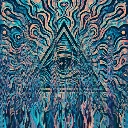
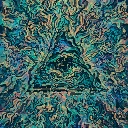
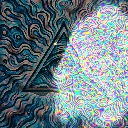
Slime Network is a liquid video effect in FRCTL, the browser VJ studio. A living vein network grows out of the bright areas and creeps across the frame.
Runs live on video, images, a camera or generated art. Stack it with any other effect, and route LFOs, envelopes or any of ten audio bands to its controls so it moves with the music.
Runs a growing vein network in its own buffer, fed by the bright areas of the frame, so glowing filaments sprout from highlights and creep outward. Ground it has already covered resists regrowth, so fronts keep pushing into fresh territory. Growth sets the feeding rate, Reach how far filaments travel, Twist straight veins versus coiled spirals, Decay how long trails last, and Glow and Hue their brightness and colour.
Using Slime Network
Where it works
Long ambient sections and pack loops, since the network takes time to grow and never repeats. Its feeding threshold follows the frame's average brightness, so dark club footage and bright daylight clips both grow without re-dialling.
With the music
Growth is the lever: B5 (mids) there lets vocals and leads feed the network in surges. Decay on a slow bar-synced LFO lets old trails evaporate and return in waves.
Starting point
Growth centre, Reach a quarter, Twist centre, Decay three-quarters, Glow centre, then wait a few seconds for the veins to join up.